GoExpand V/TO™ page displayed on a desktop monitor showing Vision, Traction, and SWOT sections with company values and long-term targets
Your V/TO™ (Vision/Traction Organizer™) in GoExpand is not meant to sit untouched once it’s created. It works best as a living document — something that evolves as your goals, Rocks, and priorities change.
When reviewed and updated regularly, your V/TO™ keeps the leadership team aligned, reinforces clarity, and ensures your strategy stays connected to execution.
This guide walks through how and why to update your V/TO™ effectively.
Why Your V/TO™ Should Be Updated Regularly
Think of your V/TO™ as the foundation of your organization’s direction. It outlines your Vision, long-term targets, Marketing Strategy, and short-term priorities.
But strategy isn’t static.
As Rocks shift, goals are achieved, markets change, or the leadership team refines direction, your V/TO™ should reflect those updates. Keeping it current ensures:
Goals stay aligned with real work
Rocks support strategic priorities
Scorecard metrics reflect what truly matters
Leadership remains unified
When your V/TO™ matches your current initiatives, your Level 10 Meeting™ discussions become clearer and execution becomes smoother.
How to Update Your V/TO™
To edit your V/TO™:
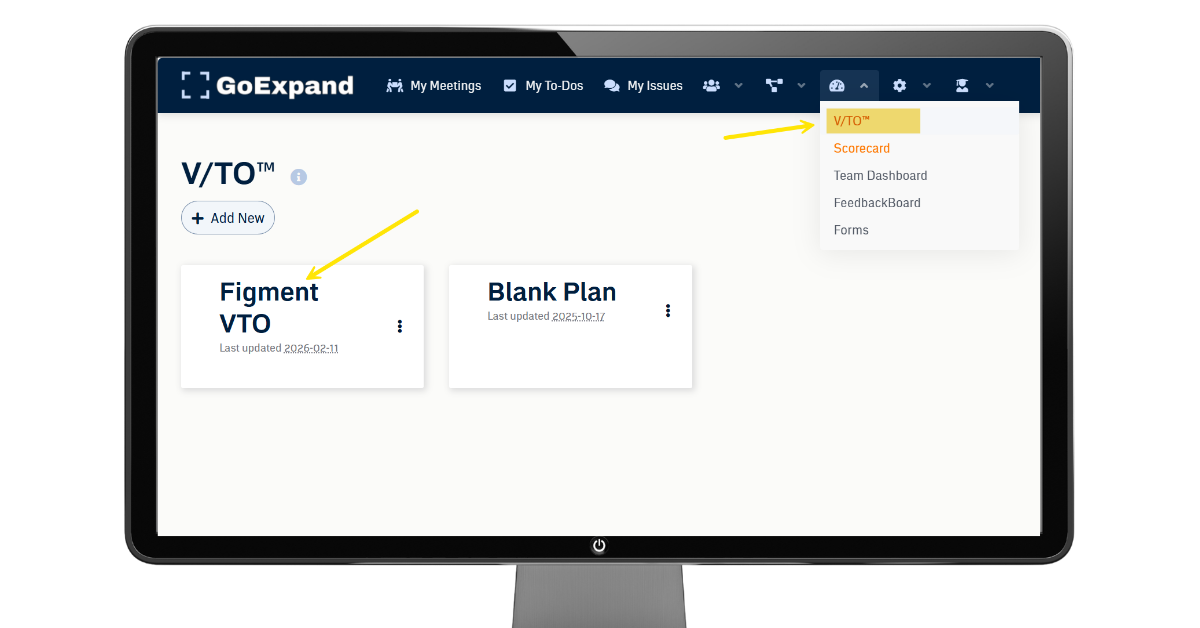
Navigate to the Performance icon in the top navigation panel.
Select V/TO™.
Choose the version you want to update.
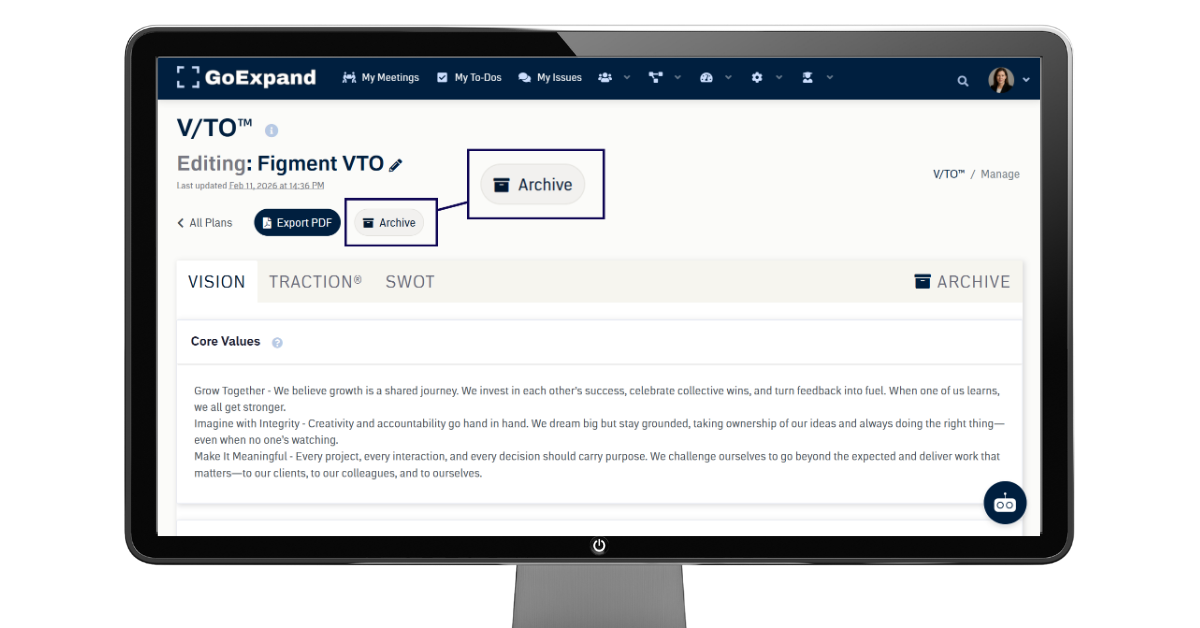
Before making changes, click Archive to capture a snapshot of the current version. This preserves your history and allows you to track how your strategy evolves over time.
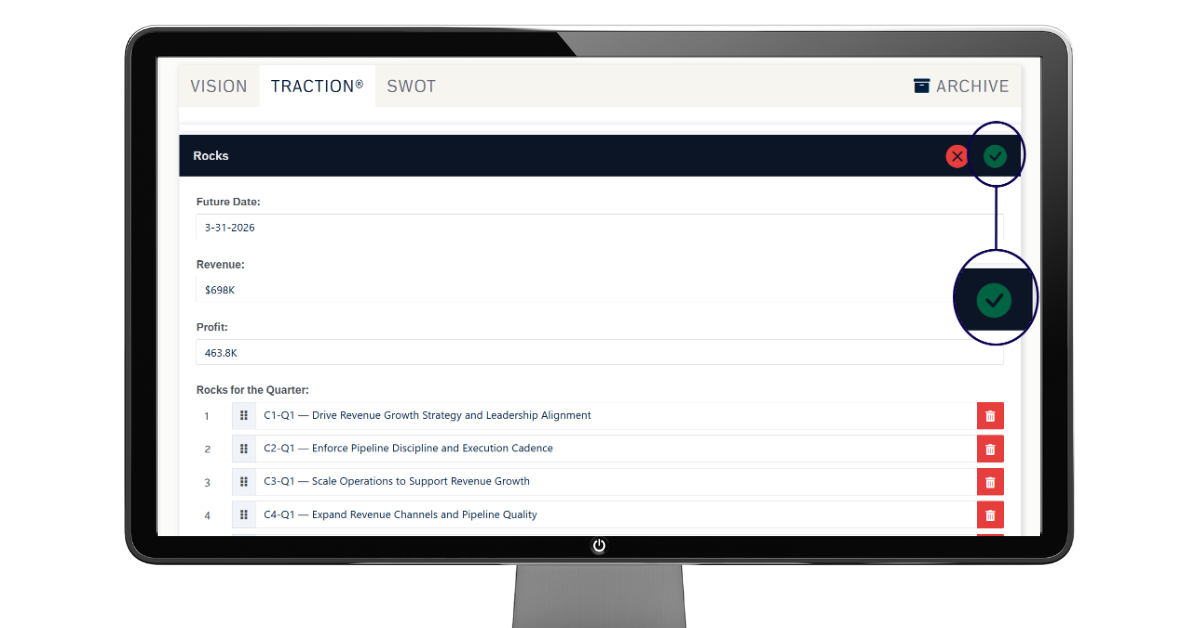
How to Edit and Save a Section of a V/TO™
Click the Edit (pencil) icon next to the section you want to update (Vision, 1-Year Plan, Quarterly Rocks, Scorecard, SWOT, etc.).
Make your changes, then click the Check Mark at the top of the section being edited to save.
Again, if you’re making major updates, click Archive first to preserve a snapshot of the current version.
Keeping your V/TO™ updated ensures your Rocks, priorities, and strategy stay aligned.
Keeping Vision Connected to Traction®
The V/TO™ works best when it connects directly to what your team is actively executing.
As new Rocks are set, quarterly priorities shift, or Scorecard metrics are adjusted, reflect those changes in your V/TO™. This keeps:
Level 10 Meetings™ focused on current priorities
Rocks aligned with long-term direction
Teams clear on what matters most
Leadership accountable to the strategy
Reviewing your V/TO™ quarterly is a strong EOS® best practice. Many organizations align updates with quarterly planning sessions or annual planning conversations.
When treated as a living document, your V/TO™ becomes more than a strategic worksheet — it becomes the roadmap that guides every Level 10 Meeting™, Rock, and performance discussion inside GoExpand.
See full training article here.
>Up Next: AI Assistant in GoExpand: How to Use OpenAI for EOS® Execution
Q&A
V/TO™ Overview
Q: What is the purpose of the V/TO™ in GoExpand?
A: The V/TO™ (Vision/Traction Organizer™) aligns your leadership team around a clear long-term vision and connects it to quarterly and annual execution.
Q: Why is the V/TO™ considered a living document?
A: Because goals, Rocks, and priorities change. Updating it keeps your strategy aligned with what the team is actually working on.
Why Updates Matter
Q: What happens if we don’t update our V/TO™ regularly?
A: The plan can become disconnected from real work, causing confusion and misalignment in meetings and execution.
Q: How often should we review the V/TO™?
A: At minimum, quarterly — typically during quarterly planning sessions.
Q: What sections of the V/TO™ are most likely to change?
A: The 1-Year Plan, Quarterly Rocks, and Scorecard are updated most frequently.
Execution & Alignment
Q: How does updating the V/TO™ improve meetings?
A: When the V/TO™ reflects current priorities, Level 10 Meetings™ become clearer, more focused, and more productive.
Q: How do Rocks connect to the V/TO™?
A: Quarterly Rocks are directly tied to the 1-Year Plan and help move the organization toward its long-term vision.
Q: Why is the Scorecard part of the V/TO™?
A: The Scorecard tracks weekly measurable numbers that show whether the organization is gaining Traction®.
Best Practices
Q: What should we do before making major updates to the V/TO™?
A: Use the Archive feature to capture a snapshot of the current version for historical tracking.
Q: Who should be involved in updating the V/TO™?
A: The leadership team — especially those who own Rocks, metrics, and strategic priorities.
Q: What’s the biggest benefit of keeping the V/TO™ current?
A: It keeps everyone aligned, focused, and accountable to the same strategy.
Further articles and references:
The Leader’s Guide to Strategic Thinking — Harvard Business Impact explores what strategic thinking involves and how leaders develop insight, planning, and action skills.
https://www.harvardbusiness.org/insight/september-2025-the-leaders-agenda-the-leaders-guide-to-strategic-thinking/
• Discovery-Driven Planning — A Harvard Business Review-cited planning methodology that helps teams build flexible plans when navigating uncertainty.
https://en.wikipedia.org/wiki/Discovery-driven_planning
• How to Turn a Strategic Vision Into Reality — MIT Sloan highlights how to refine and translate broad vision into actionable priorities and goals.
https://mitsloan.mit.edu/ideas-made-to-matter/how-to-turn-a-strategic-vision-reality
• Executing Strategy for Results — An MIT OpenCourseWare resource outlining models and tools for effective strategy execution and performance alignment.
https://mitocw.ups.edu.ec/courses/sloan-school-of-management/15-361-executing-strategy-for-results-fall-2017/